Open source · every skill on this page ships from the repo.

View source
Agent Skills

ai-automation-tools · open source · SKILL.md

Capabilities the agent loads only when it needs them.

A skill is one SKILL.md, YAML frontmatter and a set of instructions, that stays out of the model's context until it's invoked. This is the Core catalog: ten portable skills that assume nothing about the repository you're standing in.

Core skills
10
Categories
06
Files per skill
01
Dependencies
00

01 · Catalog

Core skills

Ten skills across six categories. Every one installs flat into ~/.claude/skills, so a name must be unique across the whole repo.

A README built by repo-docs-builder 01
Documentation

repo-docs-builder

A repository that reads top to bottom like somebody meant it.

  • Layout: app under src/ or site/, root stays docs and meta
  • A docs tree wired with down-links and up-links
  • A house-style README at every level, not just the root
  • A humanizer pass over every sentence of prose
  • Renders natively in both GitHub and Obsidian
SKILL.md
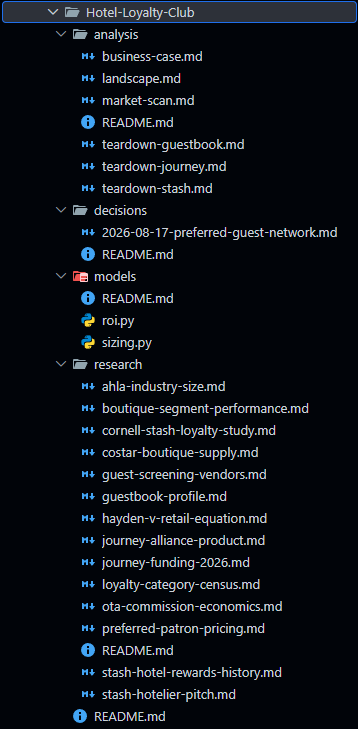
The generated output folder for a Hotel-Loyalty-Club idea, with analysis, decisions, models and research subfolders 02
Business

business-plan-builder

Eight passes from napkin idea to decision memo — with a gate that can say no.

  • Market sizing: TAM/SAM/SOM, JTBD, Five Forces
  • Competitive intelligence with graded evidence
  • An ROI model plus a sensitivity sweep
  • A decision memo gates the build half — a no-go is a complete run
  • Output is a linked markdown repo; every number sourced or tagged
SKILL.md
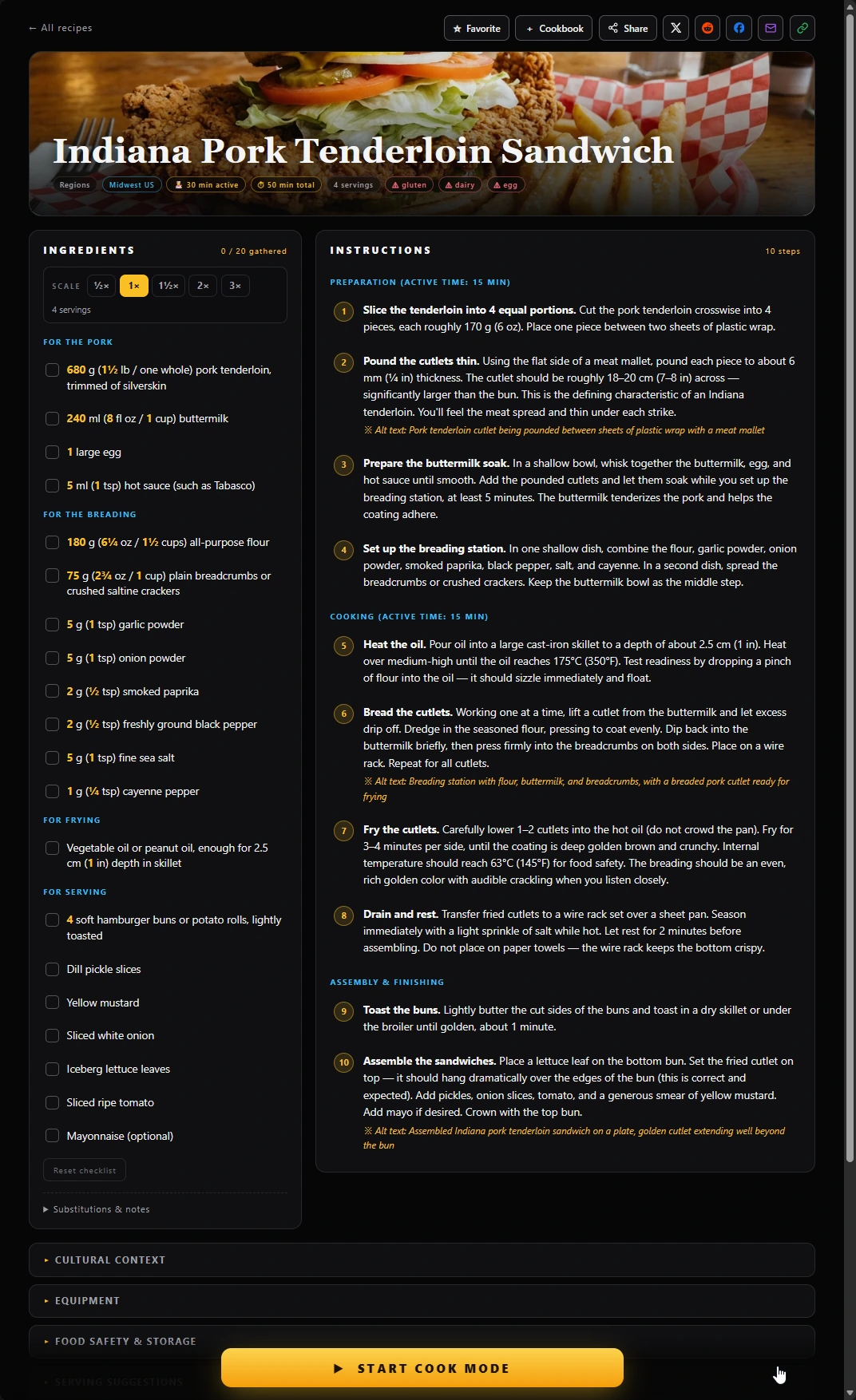
A recipe under review: an Indiana pork tenderloin sandwich with its ingredient list and ten numbered steps 03
Cooking

recipe-validator

A script does the arithmetic. You supply the judgment.

  • Food-safety temperatures and dangerous-technique flags
  • Sodium, saturated-fat and added-sugar thresholds per serving
  • Quantity and ratio sanity against comparable recipes
  • Allergen-label completeness and overall coherence
  • Findings ranked by severity, each with a concrete fix
SKILL.md
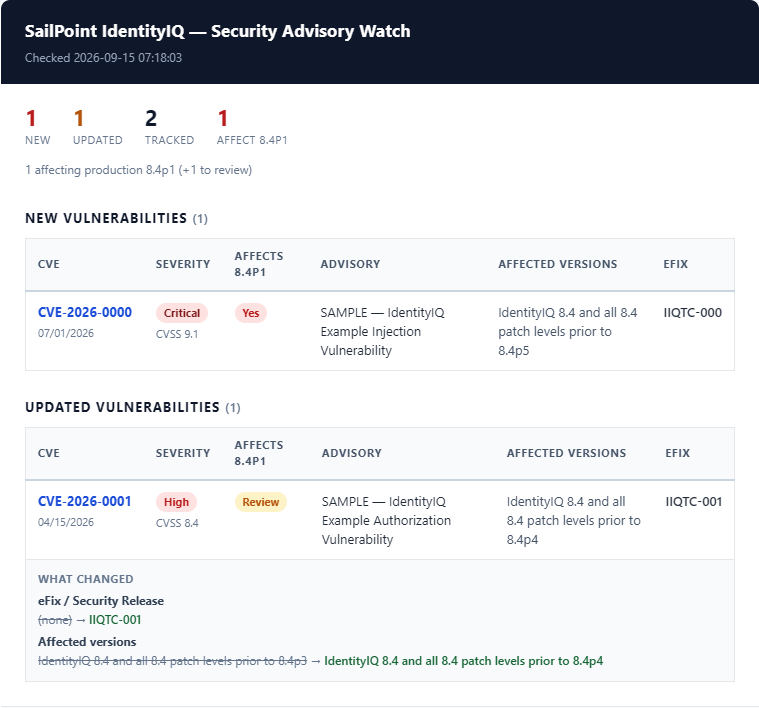
A security advisory digest email: a dark banner heading over tables of new and updated CVEs 04
Automation

html-email-templates

Three email templates that survive the clients that strip your CSS.

  • Template A — inline notification or alert for the body
  • Template B — dark banner report wrapper, attached or linked
  • Template C — light-card digest, safe to inline
  • Shared footer plus subject-line and label conventions
  • Transport-agnostic: Resend, Postmark, SendGrid, SES, SMTP
SKILL.md
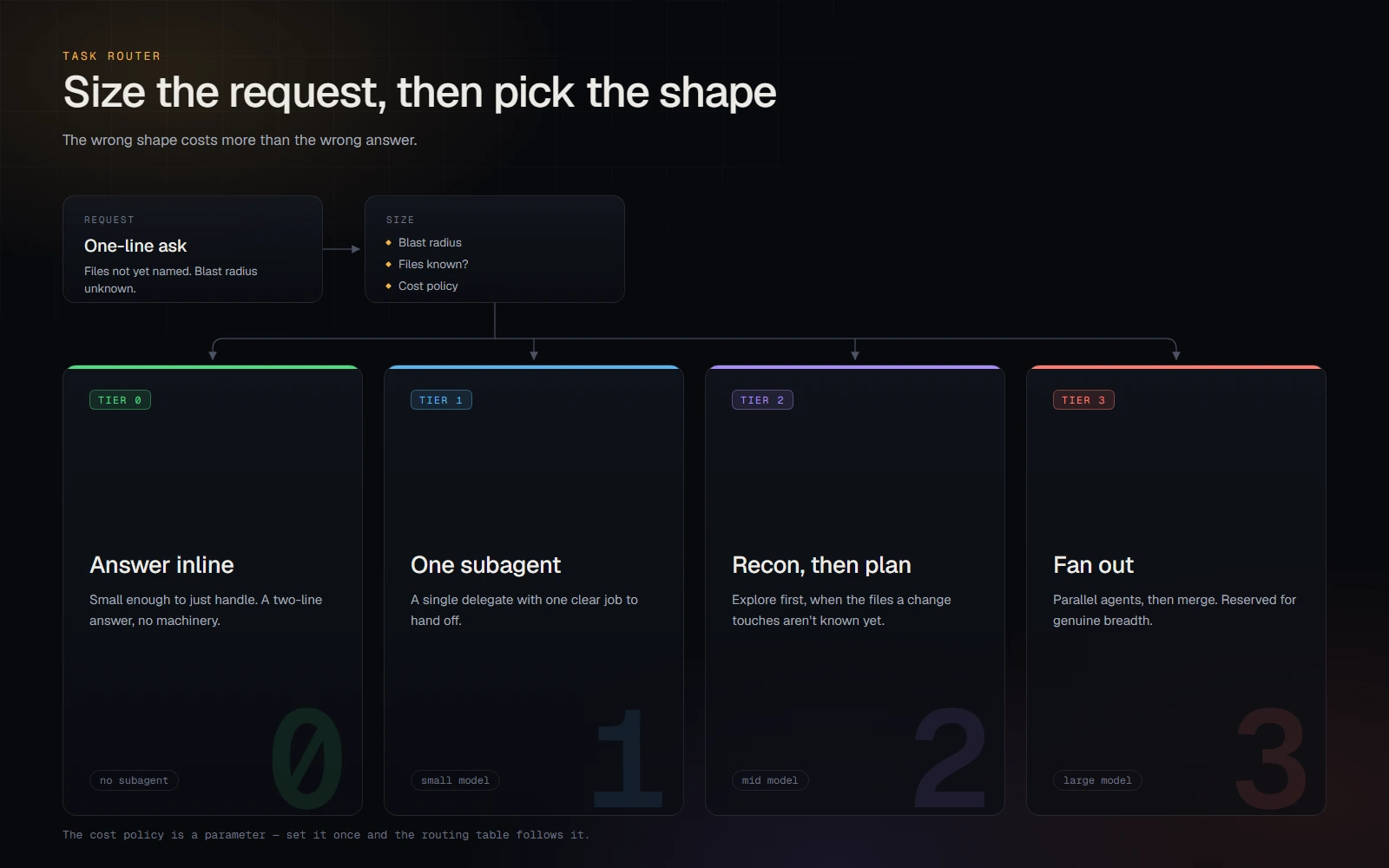
Routing diagram: a request is sized, then dispatched to one of four tiers from answer inline up to fan out 05
Automation

task-router

Size the job before you spend on it — then pick the model to match.

  • Four execution shapes: inline, one subagent, recon-then-plan, fan out
  • Picks a model tier to match the shape it chose
  • The cost policy is a parameter — set it once
  • The authorization gate for delegation, at the tier it selects
SKILL.md
A cartoon-editorial news montage, the week's stories woven into one illustrated scene 06
Image-Gen

news-images

Cartoon-editorial news imagery, eight ways.

  • Four cadences: daily, weekly, monthly, yearly
  • Collage — a six-panel grid at 1024 × 1536
  • Montage — one continuous scene at 1536 × 1024
  • Researches the stories, lays out the frame, produces the PNG
  • A dedicated prompt file for each of the eight variants
SKILL.md
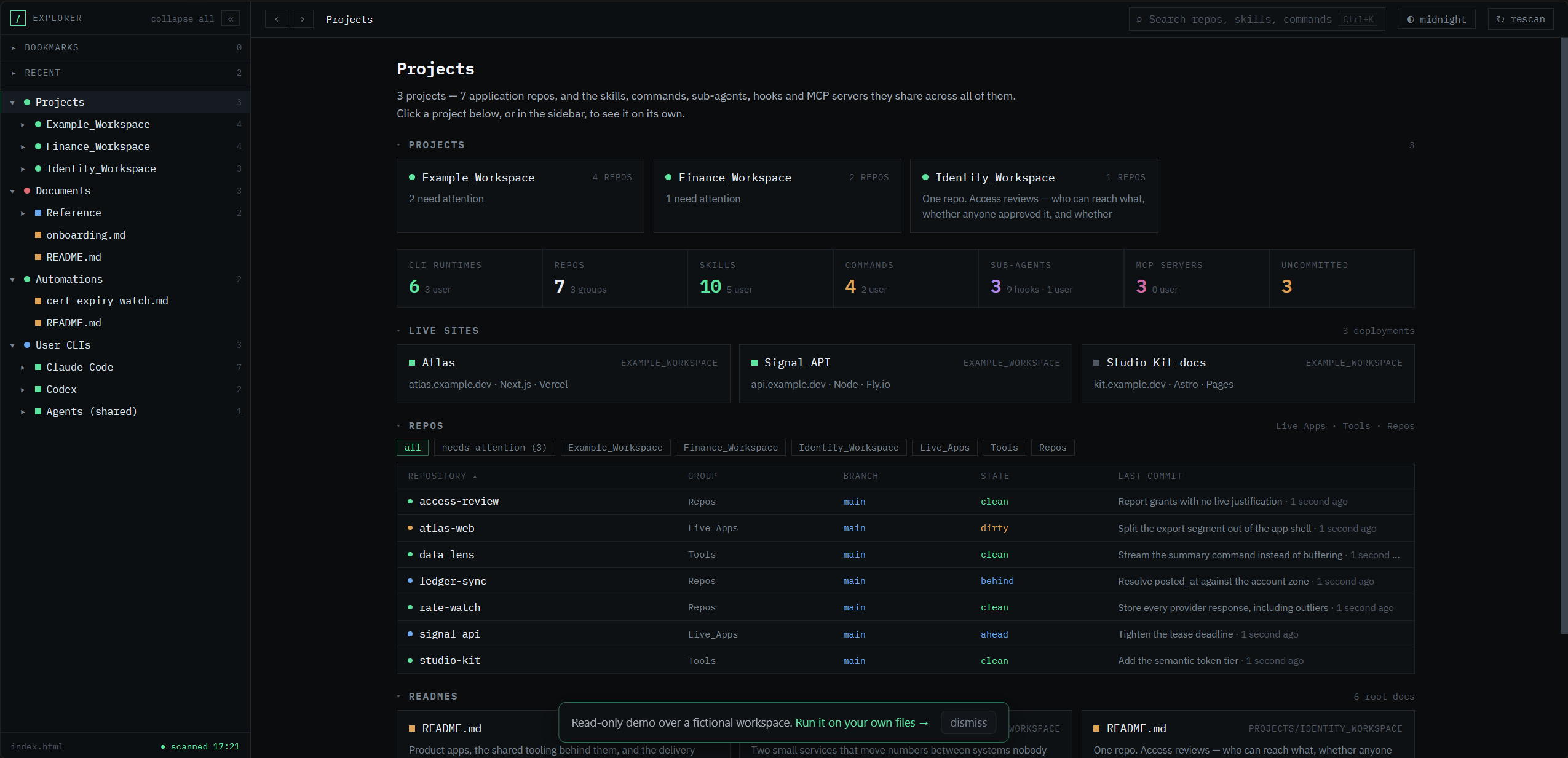
The Project Hub explorer: a sidebar document tree beside a dashboard of workspace repos 07
Web

project-hub-scaffold

A clickable document tree over any folder — no build, no install.

  • A zero-dependency Node server plus a static explorer
  • Mode A — add a workspace to an existing Hub
  • Mode B — a portable installation that carries its own engine
  • Mode C — match an existing Hub page's theme and tree
  • Source: github.com/ai-automation-tools/project-hub (MIT)
SKILL.md
The web-house-style document starter: the source bar, a top bar with the Light / Dark switch, a hero and a card grid 08
Web

web-house-style

One look for every site in the org — dark first, light on request.

  • Token blocks for the dark default and the light theme, one accent per site
  • A Light / Dark switch in the top-right corner that never flashes on load
  • The source bar, a sticky top bar, or a collapsible icon sidebar
  • A phone pass: 16px fields, 36px tap targets, dvh heights, no sideways scroll
  • Two starter pages — a document page and an app shell
SKILL.md
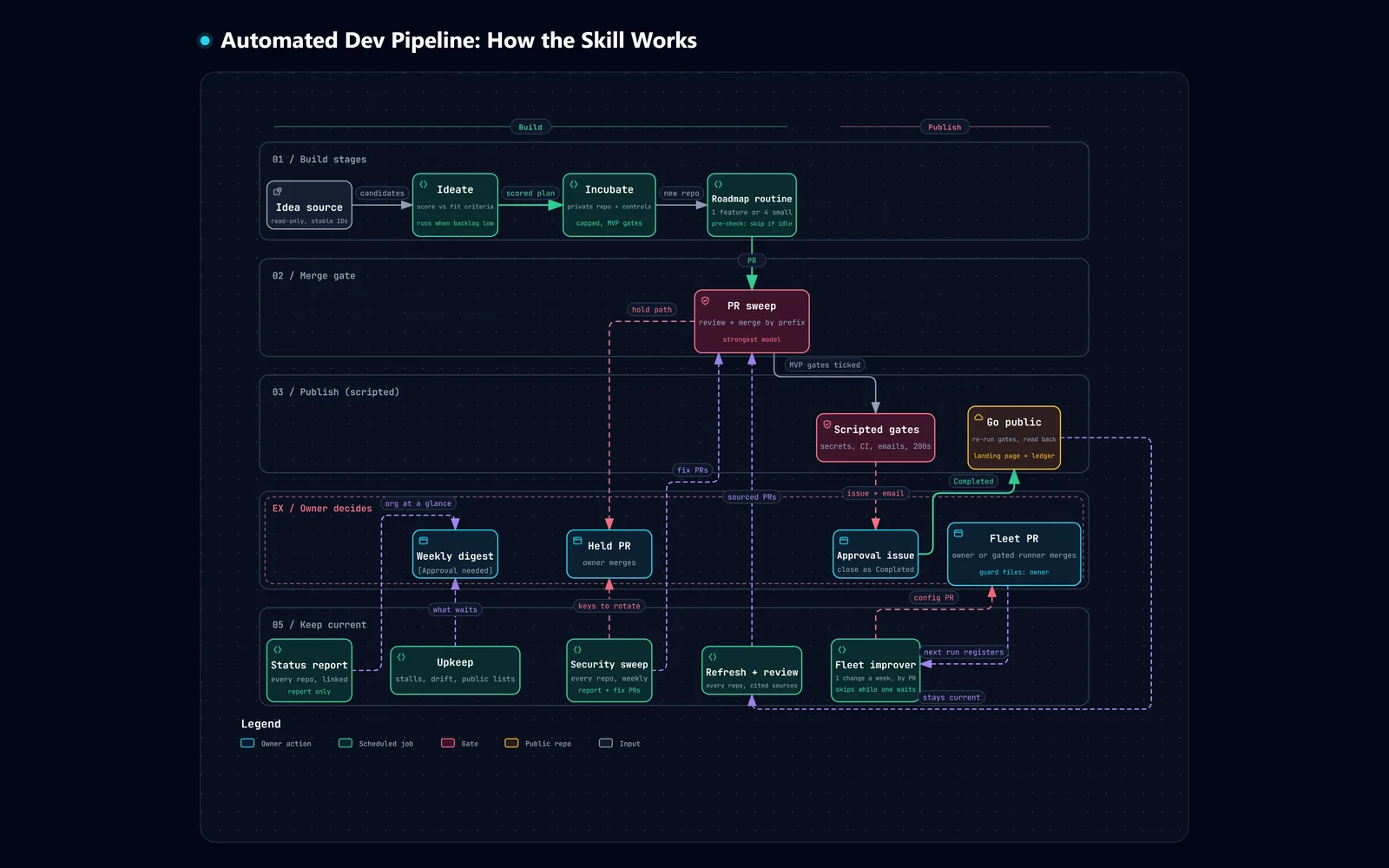
Pipeline flow: ideas become scored plans and private repos, roadmap PRs merge through one sweep, and a repo goes public only after scripted gates and a human approval 09
Automation

automated-dev-pipeline

Scheduled agents that build, publish and maintain repos — with a person at the one step that can't be undone.

  • Ideas become scored plans, then private repos built one roadmap item per PR
  • One PR sweep reviews and merges what every routine opened
  • Going public takes scripted gates and a human approval
  • Keep-current jobs refresh every repo against what it depends on, and a weekly security sweep fixes what the scanners find
  • A single-repo variant: stages as folders, a merge that deploys a site
Open the interactive diagram →
SKILL.md
10
Automation

agent-workspace-builder

A repo an agent opens to do one field's work, and two weekly jobs that keep it current.

  • AGENTS.md is the doctrine; CLAUDE.md imports it
  • Only README, ROADMAP and CHANGELOG at the docs/ root
  • A generated capability reference and a verified, dated resources list
  • Four stdlib checks that turn the layout into a CI exit code
  • Weekly roadmap and upkeep jobs: upkeep proposes, roadmap builds
SKILL.md

02 · Domains

Domain skills

Field knowledge from the org's five agent workspaces, copied here unchanged by a weekly harvest. Portable like Core, but kept separate and installed only when you ask for them with -Domain.

03 · Projects

Project skills

A second tier that installs into one repository instead of user scope, so a repo-specific skill never follows you into an unrelated session. Each group below links to its folder in the repo.

04 · Install

Three tiers, two scopes

Core installs at user scope and every session can reach it. Domain skills install there too, but only when you ask. Projects install into the repo they belong to. A bare run covers Core only, so nothing else leaks into your global catalog.

Full install & authoring guide

Core: all ten
pwsh scripts/install-skills.ps1 -Core
One skill
pwsh scripts/install-skills.ps1 -Core -Skill task-router
Domain: opt in
pwsh scripts/install-skills.ps1 -Domain
Into a project
pwsh scripts/install-skills.ps1 -Project cronsole -Destination <clone>/.claude/skills

05 · Resources

Read the source

Everything on this page comes from the repository. These are the documents behind it, and the rest of the org.